目录
飞行棋实践
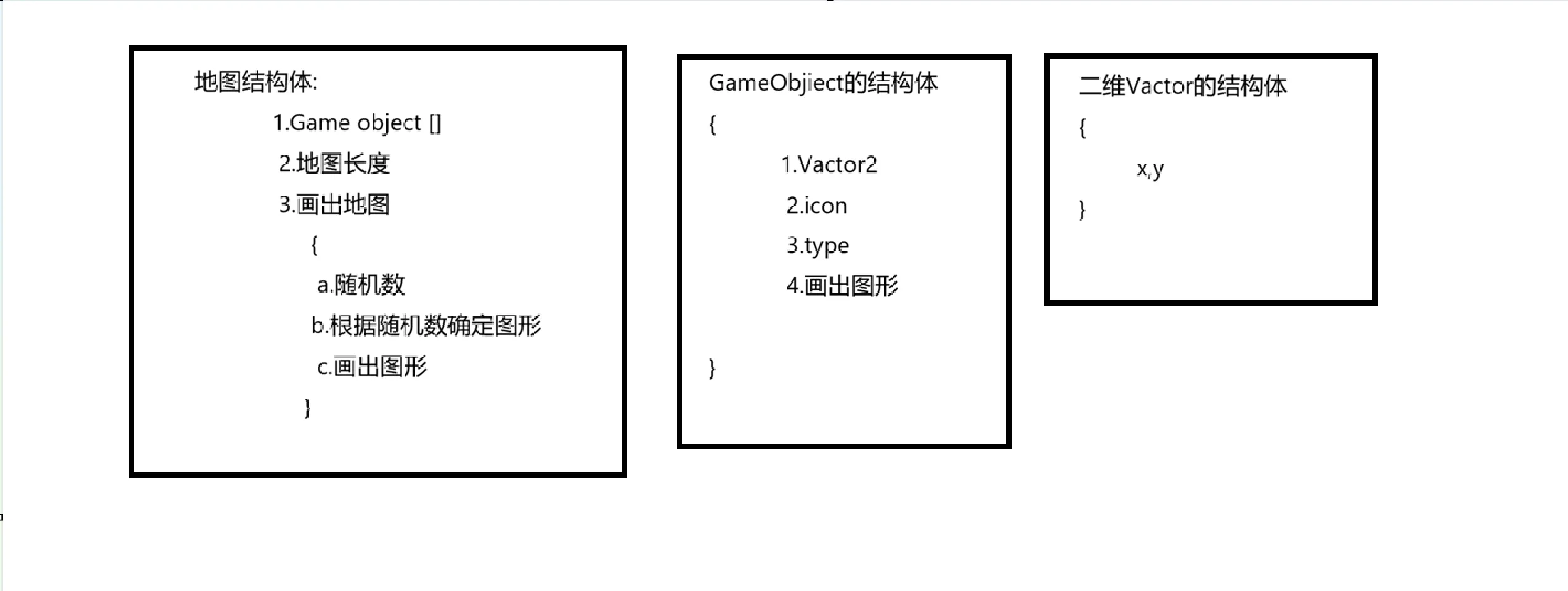
分析:
需要分开画出结构体
草图示意:
实践中的错误:
代码部分namespace Flyingchess { internal class Program { struct Vector2 { public int posx, posy; public Vector2(int x, int y) { posx = x; posy = y; } } struct GameObject { public Vector2 pos; public string icon; public GameObjectType type; public GameObject(Vector2 pos, string icon, GameObjectType type) { this.pos = pos; this.icon = icon; this.type = type; } public void Draw() { Console.SetCursorPosition(pos.posx, pos.posy); switch (type) { case GameObjectType.Nrmal: icon = "□"; break; case GameObjectType.Pause: icon = "△"; break; case GameObjectType.Landmine: icon = "●"; break; case GameObjectType.Tunnle: icon = "卍"; break; case GameObjectType.Roulette: icon = "○"; break; case GameObjectType.Play1: icon = "☆"; break; case GameObjectType.Play2: icon = "★"; break; default: break; } Console.WriteLine(icon); } } enum GameObjectType { Nrmal = 0, Pause = 1,//暂停 Landmine = 2, //地雷 Tunnle = 3,//隧道 Roulette = 4,//轮盘 Play1 = 5, Play2 = 6, } struct Map { public GameObject Gameobj; public int Map_Length; public Map(GameObject Gameobj,int Map_Length) { this.Gameobj = Gameobj; this.Map_Length = Map_Length; } public void Draw_Map() { Console.SetCursorPosition(0,0); Random r = new Random(); int num = r.Next(1,100); if (num<50) { type =GameObjectType.Nrmal;//错误出现在这里 } } } static void Main(string[] args) { } } }
public void Draw_Map()
{
    Console.SetCursorPosition(0,0);
    Random r = new Random();
    int num = r.Next(1,100);
    if (num<50)
    {
        type = GameObjectType.Nrmal;  // ❌ 错误:type 未定义,话句话说并不是Map的成员,而是GameObject的成员要想访问它就必须先通过GameObject封装的对象Gameobj来访问它:Gameobj.type  //所以封装好的调用成员必须层层递进.
        //还有一点这跟静态字段和实例字段无关,这是归属问题,就算是静态字段也不能直接调用.
    }
}
改之后:
public void Draw_Map()
{
    Console.SetCursorPosition(0, 0);
    Random r = new Random();
    int num = r.Next(1, 100);
    if (num < 50)
    {
        Gameobj.type= GameObjectType.Nrmal;
    }

}
当然也可以用中间值Newtype,先用this把字段Gameboj赋值给他,再用Newtype来调用成员type.
 public void Draw_Map()
            {
                Console.SetCursorPosition(0,0);
                Random r = new Random();
                int num = r.Next(1,100);
                GameObject Newtype = this.Gameobj;
                if (num<50)
                {
                    Newtype.type =GameObjectType.Nrmal;

                }
但用中间值有一个问题:结构体是值类型,方法结束但原来的值不改变.所以要把下一次得到的值赋给上一次.
this.Gameobj = Newtype;
注
以上两个对比也能看出来:
直接访问:Gameobj.type= GameObjectType.Nrmal;依旧改变值类型的值.
但赋GameObject Newtype = this.Gameobj;值就不会改变,
因为赋值期间会产一个副本给Newtype
有个小类比:
// int 的例子
int a = 10;           // 先存到变量
Console.WriteLine(a); // 用变量

Console.WriteLine(10); // 直接用值,不要变量

// Vector2 的例子
Vector2 v = new Vector2(5, 5);        // 先存到变量
GameObject go = new GameObject(v, ...); // 用变量

GameObject go = new GameObject(new Vector2(5, 5), ...); // 直接用 new 出来的对象,不要变量
注
new Vector2(5, 5)其实就和10是一样的是赋值内容.至于左边的Vector2 v 就和int a 一样是变量.
地图的结构体有点复杂我们一步一步来:
先创建一个简单的数组,用来存放生成的物体,还要一个长度用来计算物体个数:
        struct Map
        {
            public GameObject[] mapgos;
            public int length;
        }
很明显我们需要手动赋值,于是我们需要创建一个构造函数;
        struct Map
        {
            public GameObject[] mapgos;
            public int length;
            public Map(int length){
                this.length = length;
                mapgos = new GameObject[length];//数组创建的一个方法别忘了.

            }
        }
游戏物体的数组有了,但里面是空的,我们需要填进去:
            public Map(int length)
            {
                this.length = length;
                mapgos = new GameObject[length];//数组创建的一个方法别忘了.
                for (int i = 0; i < length; i++)
                {
                    mapgos[i] = new GameObject(new Vector2(i * 2, 10), GameObjectType.Normal);
                }
            }
或许分开看会更加明显:
                for (int i = 0; i < length; i++)
                {
                    Vector2 pos = new Vector2(i*2,10);
                    GameObjectType type= GameObjectType.Normal;
                    mapgos[i] = new GameObject(pos,type);
                }//for循环里我创建变量,然后赋值.但和上面是一样的
接下来需要画出来,创建一个方法:将GameObject[],每一项都画出来.
       struct Map
       {
           public GameObject[] mapgos;
           public int length;
           public Map(int length)
           {
               this.length = length;
               mapgos = new GameObject[length];//数组创建的一个方法别忘了.
               for (int i = 0; i < length; i++)
               {
                   Vector2 pos = new Vector2(i*2,10);
                   GameObjectType type= GameObjectType.Normal;
                   mapgos[i] = new GameObject(pos,type);
               }
           }
           public void Draw_Map()
           {
               for (int i = 0; i < mapgos.Length; i++)
               {
                   mapgos[i].Draw();//每一项(每个游戏物体)我都 调用一遍Draw(),不就成了嘛.
               }
           }
       }
接下来在Main中测试一下:
static void Main(string[] args)
{
    Console.CursorVisible = false;  // 隐藏光标
    Console.Clear();                 // 清屏

    Map map = new Map(10);
    map.Draw_Map();

    Console.ReadKey();  // 等待按键,防止窗口关闭
}
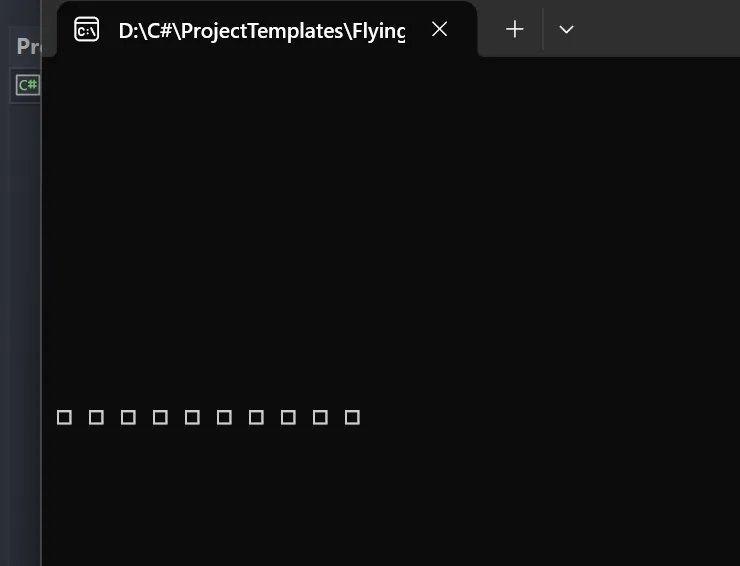 没问题,接下来我们增加随机性:
public Map(int length)
{
    this.length = length;
    Random r = new Random();
    mapgos = new GameObject[length];//数组创建的一个方法别忘了.
    for (int i = 0; i < length; i++)
    {
        Vector2 pos = new Vector2(i * 2, 10);
        int num =r.Next(1,101);
        GameObjectType type;
        if (num < 61)
        {
             type = GameObjectType.Normal;
        }
        else if (num < 71)
        {
             type = GameObjectType.Roulette;
        }
        else if (num < 81)
        {
            type = GameObjectType.Tunnle;
        }
        else if (num < 91)
        {
            type = GameObjectType.Landmine;
        }
        else if (num < 101)
        {
            type = GameObjectType.Pause;
        }
        mapgos[i] = new GameObject(pos, type);
    }
}
这样有一个问题,都是else if ,最后一句就会报错,因为编译器会认为,如果是200,怎么办?
即使你在开头已经给了范围int num =r.Next(1,101);但编译器不会管这些,
这就提到一个C#语法概念:
相关信息
C# 要求:所有可能的代码路径都必须给变量赋值。
所以要么给GameObjectType type;赋一个初始值GameObjectType type = GameObjectType.Normal;,要么把最后有一句:
else if (num < 101)
        {
            type = GameObjectType.Pause;
        }
改成:
else
        {
            type = GameObjectType.Pause;
        }
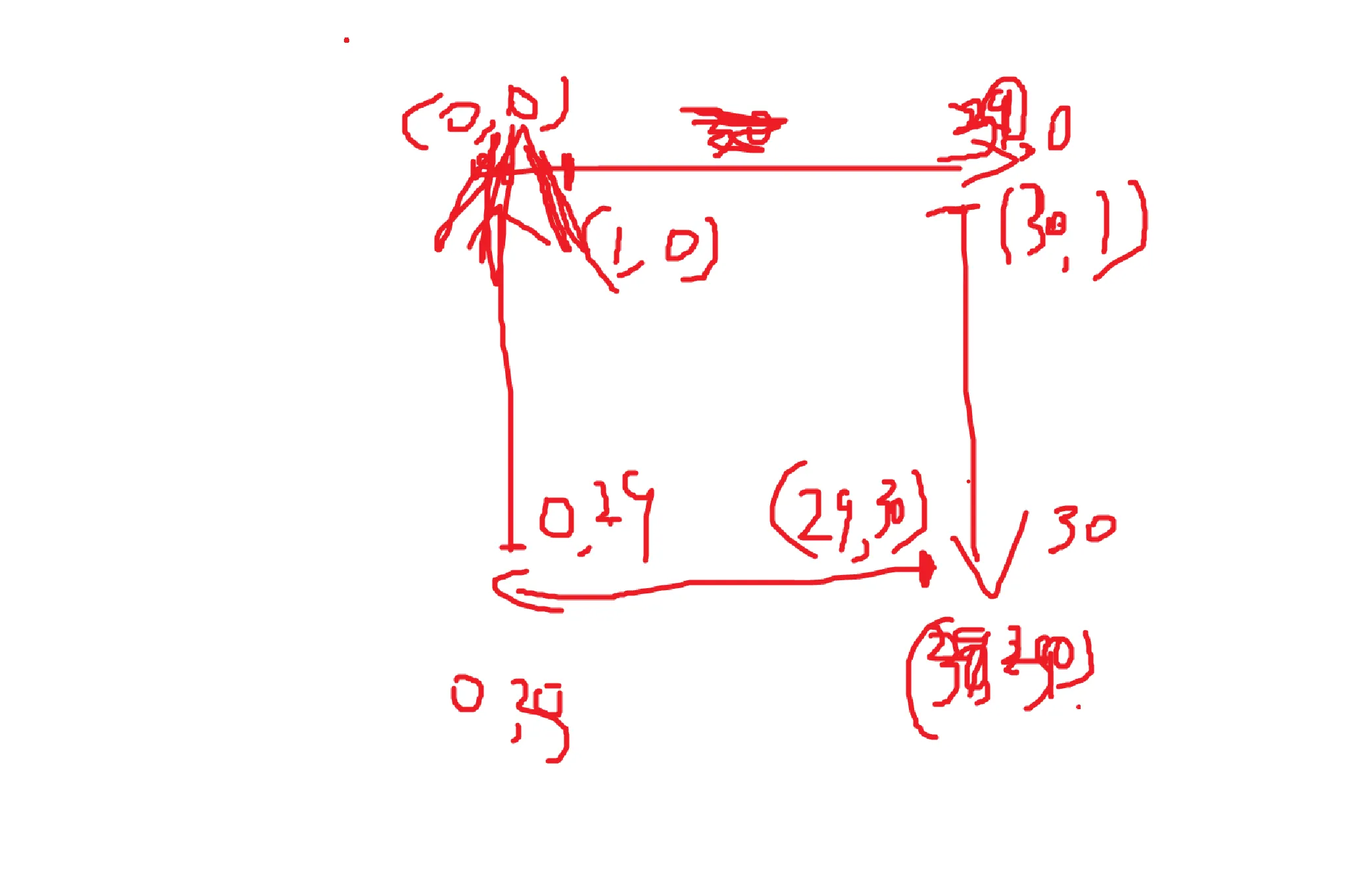
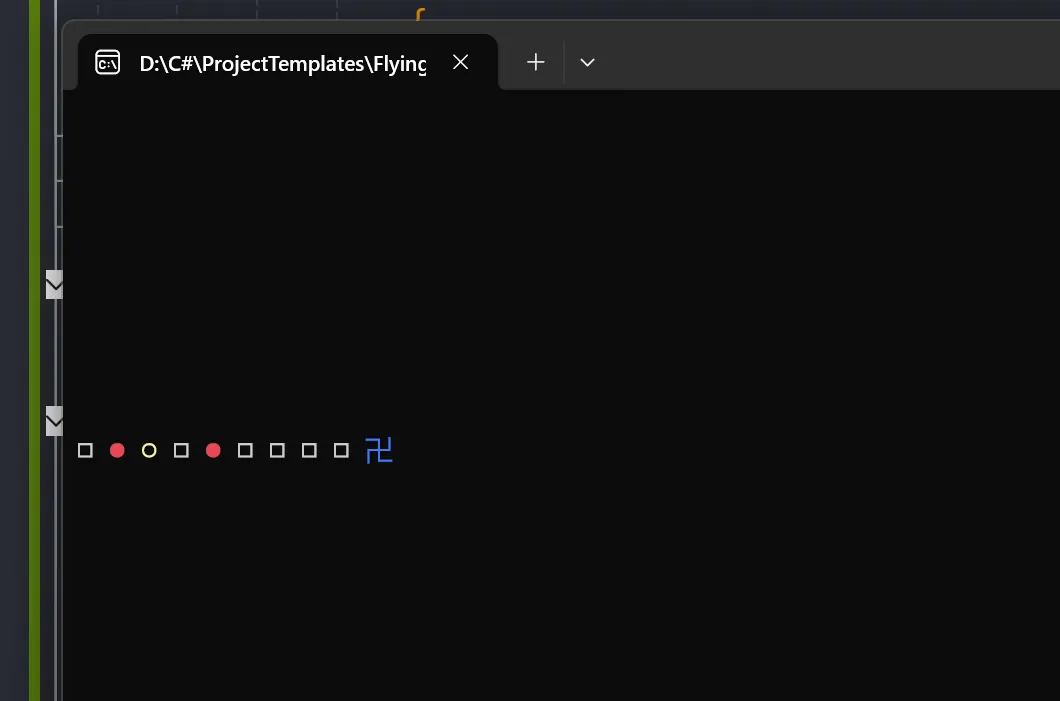 然后开始画图形:
 struct Map
        {
            public GameObject[] mapgos;
            public int length;
            public Map(int length)
            {
                this.length = length;
                Random r = new Random();
                mapgos = new GameObject[length];//数组创建的一个方法别忘了.
                for (int i = 0; i < length; i++)
                {
                    Vector2 pos;

                    // 第1段:向右走(顶部)i = 0 ~ 29
                    if (i < 30)
                    {
                        pos = new Vector2(i * 2 + 2, 1);
                    }
                    // 第2段:向下走(右边)i = 30 ~ 59
                    else if (i < 60)
                    {
                        int step = i - 30;  // 0 ~ 29
                        pos = new Vector2(62, step * 2 + 1);
                    }
                    // 第3段:向左走(底部)i = 60 ~ 89
                    else if (i < 90)
                    {
                        int step = i - 60;  // 0 ~ 29
                        pos = new Vector2(60 - step * 2, 63);
                    }
                    // 第4段:向上走(左边)i = 90 ~ 115
                    else
                    {
                        int step = i - 90;  // 0 ~ 25
                        pos = new Vector2(2, 61 - step * 2);
                    }

                    // 随机生成格子类型
                    int num = r.Next(1, 101);
                    GameObjectType type;

                    if (num < 61)
                    {
                        type = GameObjectType.Normal;
                    }
                    else if (num < 71)
                    {
                        type = GameObjectType.Roulette;
                    }
                    else if (num < 81)
                    {
                        type = GameObjectType.Tunnle;
                    }
                    else if (num < 91)
                    {
                        type = GameObjectType.Landmine;
                    }
                    else
                    {
                        type = GameObjectType.Pause;
                    }

                    mapgos[i] = new GameObject(pos, type);

            }
            }
            public void Draw_Map()
            {
                for (int i = 0; i < mapgos.Length; i++)
                {
                    mapgos[i].Draw();
                }
            }
这样计算十分麻烦,所以可以用这种方法,先设一个初始位置,然后后面所有位置都靠前一个位置来计算:
        struct Map
        {
            public GameObject[] Mapgos;
            public int length;
            public Vector2 Start;
            public Map(int length, Vector2 Start)
            {
                this.Start = Start;
                this.length = length;
                Mapgos = new GameObject[length];
                Mapgos[0] = new GameObject(Start);
                //向右:
                for (int i = 1; i < 30; i++)
                {
                    Mapgos[i] = new GameObject(new Vector2(Mapgos[i - 1].pos.posx + 1, Mapgos[i - 1].pos.posy));
                    Mapgos[i].Draw();
                }
            }
        }
using System;
using System.Collections.Generic;

namespace Flyingchess
{
    internal class Program
    {


        struct Vector2
        {
            public int posx, posy;
            public Vector2(int x, int y)
            {
                posx = x;
                posy = y;
            }
        }
        struct GameObject
        {
            public Vector2 pos;
            public string icon;
            public GameObjectType type;
            public GameObject(Vector2 pos, GameObjectType type = GameObjectType.Normal)
            {
                this.pos = pos;
                this.icon = "";
                this.type = type;
            }

            public void Draw()
            {
                Console.SetCursorPosition(pos.posx, pos.posy);
                switch (type)
                {
                    case GameObjectType.Normal:

                        icon = "□";
                        Console.ForegroundColor = ConsoleColor.Green;
                        break;
                    case GameObjectType.Pause:
                        icon = "△";
                        Console.ForegroundColor = ConsoleColor.Yellow;
                        break;
                    case GameObjectType.Landmine:
                        icon = "●";
                        Console.ForegroundColor = ConsoleColor.Blue;
                        break;
                    case GameObjectType.Tunnle:
                        icon = "卍";
                        Console.ForegroundColor = ConsoleColor.Red;
                        break;
                    case GameObjectType.Roulette:
                        icon = "○";
                        Console.ForegroundColor = ConsoleColor.Magenta;
                        break;
                    case GameObjectType.Play1:
                        icon = "☆";
                        break;
                    case GameObjectType.Play2:
                        icon = "★";
                        break;
                    default:
                        break;
                }
                Console.Write(icon);
            }

        }

        enum GameObjectType
        {
            Normal = 0,
            Pause = 1,//暂停
            Landmine = 2, //地雷
            Tunnle = 3,//隧道
            Roulette = 4,//轮盘
            Play1 = 5,
            Play2 = 6,

        }
        struct Map
        {
            public GameObject[] Mapgos;
            public int length;
            public Vector2 Start;
            public Map(int length, Vector2 Start)
            {
                this.Start = Start;
                this.length = length;

                Mapgos = new GameObject[length];
                Mapgos[0] = new GameObject(Start);


                //向右:
                for (int i = 1; i <= 25; i++)
                {

                    Mapgos[i] = new GameObject(new Vector2(Mapgos[i - 1].pos.posx + 2, Mapgos[i - 1].pos.posy));

                }
                for (int i = 26; i <= 50; i++)
                {

                    Mapgos[i] = new GameObject(new Vector2(Mapgos[i - 1].pos.posx, Mapgos[i - 1].pos.posy + 1));

                }
                for (int i = 51; i <= 75; i++)
                {

                    Mapgos[i] = new GameObject(new Vector2(Mapgos[i - 1].pos.posx - 2, Mapgos[i - 1].pos.posy));

                }
                for (int i = 76; i < 100; i++)
                {

                    Mapgos[i] = new GameObject(new Vector2(Mapgos[i - 1].pos.posx, Mapgos[i - 1].pos.posy - 1));

                }
                Console.ForegroundColor = ConsoleColor.Gray;
            }
            public void Gameobjestdate()
            {
                Random r = new Random();
                int num = r.Next(1, 101);
                for (int i = 0; i < length; i++)
                {
                    if (num < 61)
                    {
                        Mapgos[i].type = GameObjectType.Normal;
                    }
                    else if (num < 71)
                    {
                        Mapgos[i].type = GameObjectType.Roulette;
                    }
                    else if (num < 81)
                    {
                        Mapgos[i].type = GameObjectType.Tunnle;
                    }
                    else if (num < 91)
                    {
                        Mapgos[i].type = GameObjectType.Landmine;
                    }
                    else if (num < 101)
                    {
                        Mapgos[i].type = GameObjectType.Pause;
                    }
                }
            }
        }

                Map go = new Map(100, new Vector2(4, 2));
                Console.ReadKey();
            }

        }
    }
然后可以创建一个函数当统一的接口就不需要,在整理方向的时候整理一次画一次.
using System;
using System.Collections.Generic;

namespace Flyingchess
{
    internal class Program
    {


        struct Vector2
        {
            public int posx, posy;
            public Vector2(int x, int y)
            {
                posx = x;
                posy = y;
            }
        }
        struct GameObject
        {
            public Vector2 pos;
            public string icon;
            public GameObjectType type;
            public GameObject(Vector2 pos, GameObjectType type = GameObjectType.Normal)
            {
                this.pos = pos;
                this.icon = "";
                this.type = type;
            }

            public void Draw()
            {
                Console.SetCursorPosition(pos.posx, pos.posy);
                switch (type)
                {
                    case GameObjectType.Normal:

                        icon = "□";
                        Console.ForegroundColor = ConsoleColor.Green;
                        break;
                    case GameObjectType.Pause:
                        icon = "△";
                        Console.ForegroundColor = ConsoleColor.Yellow;
                        break;
                    case GameObjectType.Landmine:
                        icon = "●";
                        Console.ForegroundColor = ConsoleColor.Blue;
                        break;
                    case GameObjectType.Tunnle:
                        icon = "卍";
                        Console.ForegroundColor = ConsoleColor.Red;
                        break;
                    case GameObjectType.Roulette:
                        icon = "○";
                        Console.ForegroundColor = ConsoleColor.Magenta;
                        break;
                    case GameObjectType.Play1:
                        icon = "☆";
                        break;
                    case GameObjectType.Play2:
                        icon = "★";
                        break;
                    default:
                        break;
                }
                Console.Write(icon);
            }

        }

        enum GameObjectType
        {
            Normal = 0,
            Pause = 1,//暂停
            Landmine = 2, //地雷
            Tunnle = 3,//隧道
            Roulette = 4,//轮盘
            Play1 = 5,
            Play2 = 6,

        }
        struct Map
        {
            public GameObject[] Mapgos;
            public int length;

            public void GetLength()
            {
                length = 100;


            }
            public void SetGameObject(Vector2 StartPos)
            {
                GetLength();
                Mapgos = new GameObject[length];

                Mapgos[0] = new GameObject(StartPos);


                //向右:
                for (int i = 1; i <= 25; i++)
                {

                    Mapgos[i] = new GameObject(new Vector2(Mapgos[i - 1].pos.posx + 2, Mapgos[i - 1].pos.posy));

                }
                for (int i = 26; i <= 50; i++)
                {

                    Mapgos[i] = new GameObject(new Vector2(Mapgos[i - 1].pos.posx, Mapgos[i - 1].pos.posy + 1));

                }
                for (int i = 51; i <= 75; i++)
                {

                    Mapgos[i] = new GameObject(new Vector2(Mapgos[i - 1].pos.posx - 2, Mapgos[i - 1].pos.posy));

                }
                for (int i = 76; i < 100; i++)
                {

                    Mapgos[i] = new GameObject(new Vector2(Mapgos[i - 1].pos.posx, Mapgos[i - 1].pos.posy - 1));

                }

            }
            public void SetGameobjesttype()
            {
                Random r = new Random();

                for (int i = 0; i < length; i++)
                {
                    int num = r.Next(1, 101);            //不能放循环外面,不然就只生成一个随机数
                    if (num < 61)
                    {
                        Mapgos[i].type = GameObjectType.Normal;
                    }
                    else if (num < 71)
                    {
                        Mapgos[i].type = GameObjectType.Roulette;
                    }
                    else if (num < 81)
                    {
                        Mapgos[i].type = GameObjectType.Tunnle;
                    }
                    else if (num < 91)
                    {
                        Mapgos[i].type = GameObjectType.Landmine;
                    }
                    else if (num < 101)
                    {
                        Mapgos[i].type = GameObjectType.Pause;
                    }
                }
            }

            public void Map_Draw(Vector2 StartPos) //接口部分:调用前面的参数,
            里面可以设置一个参数Vector2 StartPos传入SetGameObject,作为起始位置.
            {

                SetGameObject(StartPos);
                SetGameobjesttype();
                for (int i = 0; i < length; i++)
                {

                    Mapgos[i].Draw();
                    Console.ResetColor();
                }

            }
        }
            static void Main(string[] args)
            {

                Map go = new Map();
                go.Map_Draw(new Vector2(2,4));

                Console.ReadKey();
            }

        }
    }
本文作者:Leemoon
本文链接:
版权声明:本博客所有文章除特别声明外,均采用 BY-NC-SA 许可协议。转载请注明出处!